Task 0 — Bonus
Bonus Task
Time to Shine Brighter
Mission Brief
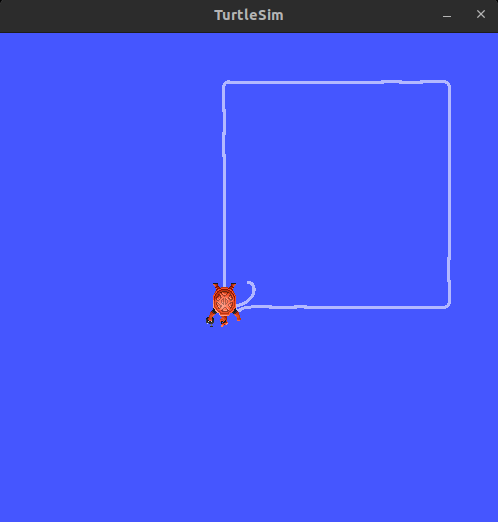
Section titled “Mission Brief”The battlefield needs a steady patrol route — and you are in charge of programming it. Your mission is to make the Turtlesim turtle navigate in a perfect square, using a ROS 2 subscriber node to follow goal points published by our command node.
You will:
- Create your own ROS 2 workspace
- Build a package containing both a goal publisher (given) and your goal follower (to be implemented)
- Command the turtle to move from point to point using proportional control
Task Components
Section titled “Task Components”-
Executable Provided:
goal_publisher.py— Publishes four goal points (square vertices) on the/goaltopic. The next goal is published only after the turtle reaches the current one. -
Your Task: Implement
go_to_goal.pythat:- Subscribes to
/goalto receive the next goal position (geometry_msgs/msg/Point) - Moves the turtle toward the goal using proportional control (linear & angular velocities)
- Publishes the turtle’s current pose to
/turtle1/goal_statuswhen the goal is reached
- Subscribes to
-
Node Functionality:
- Continuously receive and move to each goal until the square path is complete
- Use
/turtle1/cmd_velto send velocity commands - Use
/turtle1/poseto read the turtle’s current position
Procedure
Section titled “Procedure”-
Create Workspace Open a terminal and create a new ROS 2 workspace named
hb_ws:Terminal window mkdir -p ~/hb_ws/srccd ~/hb_ws/src -
Create Python Package Inside
hb_ws/src, create a new package named bonus_task:Terminal window ros2 pkg create --build-type ament_python bonus_taskThis will generate the basic package structure.
-
Add Python Files Inside the
bonus_task/bonus_task/directory:- Download the files from here.
- Extract the downloaded file and place it inside the bonus_task folder. Kindly check the package structure mentioned below to avoid any confusion
- Ensure there’s an init.py file (can be empty)
- Add:
goal_publisher.py(provided by us)go_to_goal.py- Complete your scriptgo_to_goal.pyand then run it to draw the square as given in the picture below.
Your package structure should look like this:
Terminal window hb_ws/└── src/└── bonus_task/├── bonus_task/│ ├── __init__.py│ ├── goal_publisher.py│ └── go_to_goal.py├── package.xml├── setup.cfg└── setup.py -
Edit
setup.pyTo run both files with ros2 run, edit the setup.py so it contains:Terminal window entry_points={'console_scripts': ['goal_publisher = bonus_task.goal_publisher:main','go_to_goal = bonus_task.go_to_goal:main',],},Replace main with the actual function name that starts your node in each file.
-
Build the Workspace From the root of your workspace:
Terminal window cd ~/hb_wscolcon buildSource the workspace:
Terminal window source install/setup.bash -
Run the Simulation
-
Start Turtlesim
Terminal window ros2 run turtlesim turtlesim_node -
Run Goal Publisher in a new terminal:
Terminal window cd ~/hb_wssource install/setup.bashros2 run bonus_task goal_publisher -
Run Your Subscriber in another terminal:
Terminal window cd ~/hb_wssource install/setup.bashros2 run bonus_task go_to_goal
-
Expected Output
Section titled “Expected Output”